Room to change your mind
Pages, site data, CSS, JavaScript and assets stay in the private draft while you work. A preview lets you check them together.
Build and edit your website with your coding agent. Review the result in VoxelSite, publish when it is ready, and give your client a browser editor.
Connect your coding agent through Model Context Protocol (MCP). Create the website, make changes, and manage what goes live from the same conversation.
Your client can edit the same site in VoxelSite. Keep the files and the editor on your own PHP hosting.
You: Build a website for my bicycle repair shop. Three pages: home, our workshop, and contact. Let me review it before it goes live.
voxelsite_changes_applyDraftvoxelsite_preview_createPreviewAssistant: The three-page draft is ready. I added shared navigation, repair services and a contact form. Open the preview to check the content and layout. Nothing is published yet.
Ready for your review
You: I’ve checked the preview. Publish this version and save a snapshot.
voxelsite_publish_applyLivevoxelsite_snapshots_createSavedAssistant: The reviewed site is published. I saved a snapshot of this version so we can return to it later.
You: We’re opening on Saturdays. Add a repairs page and link it in the navigation. Keep this in the draft for now.
voxelsite_changes_applyDraftAssistant: Saturday repairs is in the draft, with a new page and navigation link. The original website is still live.
Draft changed · Live site unchanged
You: That looks good. Publish the Saturday repairs update.
voxelsite_publish_applyLiveAssistant: The reviewed update is live. The Saturday repairs page and navigation link are now on the public website.
You: We need to postpone. Restore the original public site, but keep the Saturday work in our draft.
voxelsite_restore_applyRestoredAssistant: The original site is live again. Your Saturday repairs page and navigation changes are still in the private draft, ready for another day.
Original site restored · Newer draft kept
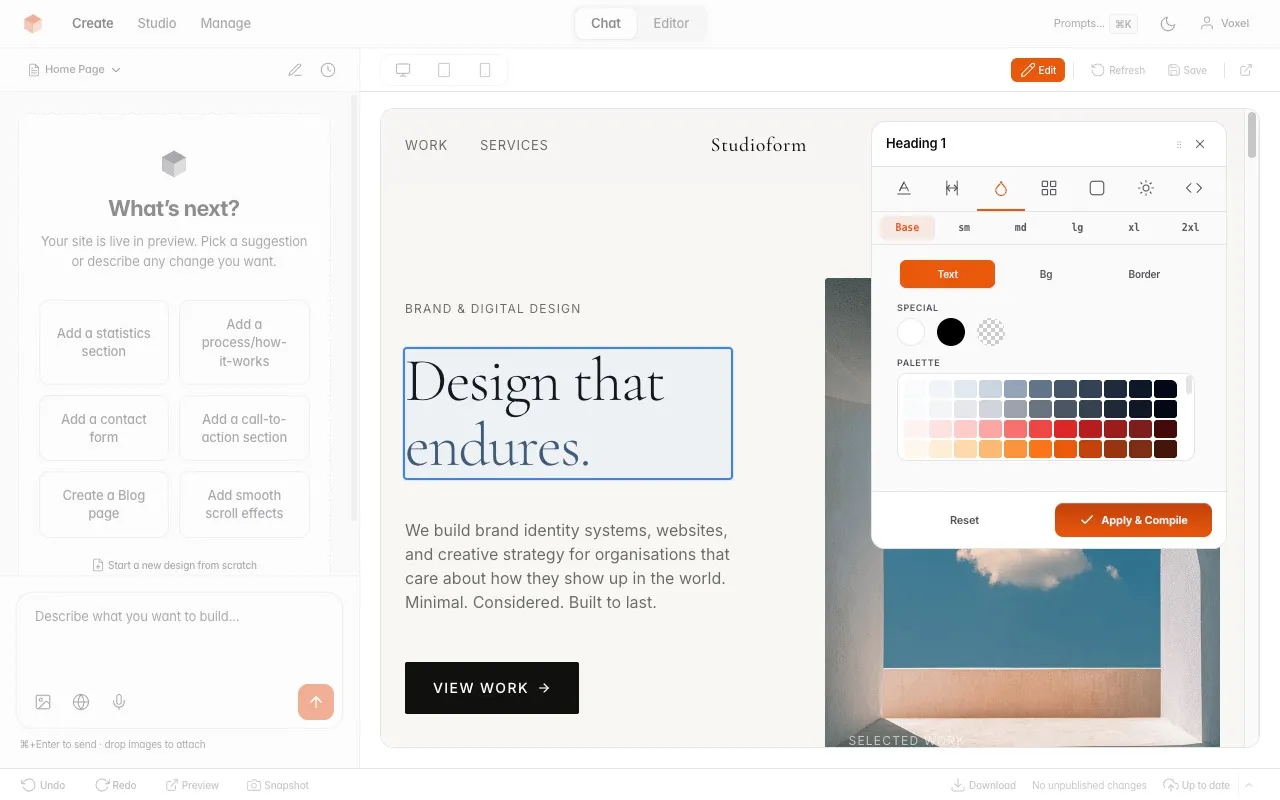
The agent and Studio use the same private draft. Preview the result, make a manual adjustment, or keep building in the conversation.
Explore the browser editorModel Context Protocol lets your coding agent use VoxelSite’s website tools. The connection points to your installation, with access you control.
Read the connection guideUse PHP 8.2+ hosting with SQLite. Run the browser installer and choose external AI or manual editing. You can configure built-in AI later.
Installation guideAs the Owner, open Settings → AI tool connections. Choose the account and access level, label the connection, and copy its endpoint and one-time credential.
Use the setup instructions shown in Studio. Store the credential in your client’s environment or secret manager. Start by asking the agent to inspect the site.
Keep the credential out of prompts, screenshots and source control.
Use the agent for a new page or a larger redesign. Open Studio for a text edit, a visual check or client handover. Both work on the same draft and history.
Pages, site data, CSS, JavaScript and assets stay in the private draft while you work. A preview lets you check them together.
Review the file changes and the rendered page. If another edit changes the draft, the old publication review no longer applies.
Review a restore from a saved snapshot. Return the live website to that state while keeping your newer draft when needed.
Website snapshots cover the website. Keep hosting backups for the installation, inbox records, accounts and configuration.
Connect agents you trust. PHP authoring is code access to your site, and publishing is access to its public version.
Read the permission guideRead-only access lets the agent inspect permitted site content without changing it.
Authoring access lets the agent prepare and apply changes. Keep publish access off if you want to publish from Studio yourself.
These actions require their corresponding permissions and a current review. An agent cannot gain them by asking in a prompt.
Credential changes, reset and other sensitive operations have additional owner approval boundaries. Revoke a connection in Studio when its work is done.
Studio MCP does not send the agent’s work to the model provider configured in VoxelSite.
See running costsStudio MCP manages your website. The public website’s MCP endpoint serves visitors. The REST API is available for your HTTP integrations.
Manage your website
Connect your coding agent to create and edit a private draft, inspect changes, publish, and restore a saved version. Each connection has its own access permissions.
/_studio/mcp.phpIntegrate over HTTP · beta
Authenticated HTTP operations for scripts and integrations. AI prompt execution needs separate permission and uses the configured provider.
Read about the Agent APIServe site visitors
Published site information and enabled visitor actions. These tools do not give visitors access to Studio or the private draft.
Read about visitor actionsCheck the hosting requirements and decide who can edit and publish each client site.