Edit and publish PHP sites in your browser.
Connect your coding agent through Studio MCP, or use Studio’s AI, visual and code editors. Preview and publish the same private draft. Leave Studio installed so clients can keep their PHP website up to date.
Build from your coding agent.
Studio MCP connects your agent to the installed website. Prepare changes in a private draft, inspect the preview and file changes, and publish an explicit version. Restore a saved site version when needed.
Explore Studio MCPThe agent uses its own AI account. VoxelSite’s built-in provider key is optional for this workflow. Your client can continue editing the same site in the browser.
Connect your agentStart a draft from the brief.
Describe the business, pages, and content you need. VoxelSite sends that request to your chosen AI provider and writes the site files. Check the preview, correct the business facts, and ask for changes.
- Multi-page sites with navigation and forms
- Request edits to a page or selected section
- The AI reads the site context your request needs
- Site Memory stores business facts and design decisions for later requests
Choose models for different kinds of work.
Use TypeSafe's Jev to assess each request. Small copy edits can use your Faster model with focused instructions; larger changes use your Stronger model. Keep every editing tool, with your default model ready when routing cannot proceed.
See how Jev routing worksMake small edits on the preview.
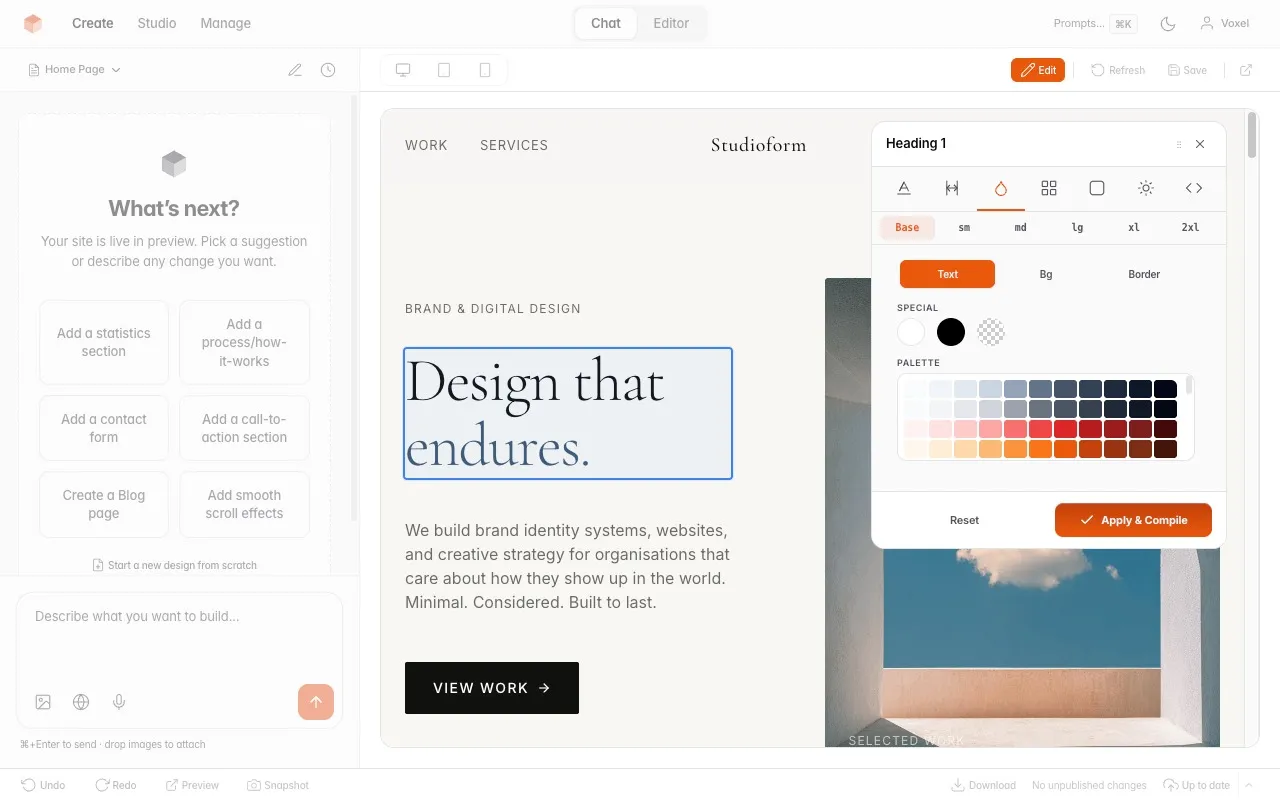
Select text to edit it, swap a photo from the asset library, or adjust spacing and typography in the style panel. Open the source popup when the change needs HTML. Check the result at the relevant screen sizes.
- Style panel: colors, typography, spacing per breakpoint
- Inline source editor for any element
- Image picker to swap from your uploaded assets
Open the code.
The generated code is standard PHP, HTML, and CSS. Open any file in the built-in editor with syntax highlighting and tabs. Or download the files and work in VS Code, PhpStorm, or whatever you use. Inline AI lets you select code and describe changes.
- File tree with all generated project files
- Inline AI: select code, describe the change
- Standard PHP/CSS/JS you can open in any editor
Design library.
Save a named design before trying another direction. You can preview and load saved designs from the library. Keep snapshots for restoring site states, and keep separate hosting backups for the installation and its data.
- Gallery view with live previews and descriptions
- Load, preview, rename, or delete any saved design
- History tab for full version timeline
Keep client assets in the Studio.
Upload client photos, documents, and custom fonts to the asset library. Choose an uploaded image from the preview to replace it. VoxelSite stores these files on your server; AI requests send the provider the context needed for generation.
- Drag & drop upload with preview gallery
- Click any image in the editor to swap it
- Images, documents, code, and custom fonts
Actions and forms.
Define an action such as a quote request with the fields you need. Visitors submit it through a form; compatible AI tools can call it through the public MCP endpoint. Review submissions in the Studio. Booking request forms collect enquiries; they do not manage live availability.
- 3 display styles: bottom bar, floating button, minimal pill
- Submission inbox with status, notes, and referrer tracking
- Brand color and light/dark scheme per action
Board and notes.
Track what needs doing without leaving the Studio. A kanban board with To Do, In Progress, and Done columns. Link cards to specific pages for context. Write notes in markdown for copy drafts, content plans, or client feedback. Pin the important ones.
- Board cards linked to site pages
- Markdown notes with pinning and search
- Notes are private per team member
Team access.
Give a client a Viewer account to review progress, or an Editor account to make changes. Editors can use AI, edit code, and publish; this is broader access than a content-only login. The Owner manages the installation and team.
- Owner, Editor, and Viewer accounts
- Choose read-only review or editing access
- Each member has separate notes
Inspect the files you will hand over.
VoxelSite writes PHP pages, shared partials, CSS, and JavaScript. Published pages work without the Studio. PHP ZIP exports also support public read-only MCP tools and basic forms. Studio form handling, Actions, public MCP action tools and Studio MCP need the Studio backend.
Open the site files in your usual editor. Check the output and its dependencies before moving to another PHP host. Full output docs →
VoxelSite generates sitemap, robots.txt, and discovery files. Review page titles and structured data before launch. SEO & AI discovery docs →
More tools in the Studio.
These tools ship with VoxelSite. Hosting and AI usage are separate costs.
AI drafts and edits
Describe a client site or a change to an existing page. VoxelSite sends the request to your AI provider and writes files you can inspect in preview. Review facts, design, and behavior before publishing.
Visual editing
Edit text on the preview, swap images, and adjust colors, typography, or spacing. Use the source popup or Edit with AI for changes that need more than the style controls.
Preview and publish
Work on the preview before publishing changes to the live site. Publishing compiles the CSS and updates the site files. You decide when the result is ready.
Client and team accounts
Give each person a login. Viewers can review the site. Editors can change pages, use AI, and publish. The Owner manages the team and installation; Editor access is not limited to copy changes.
Snapshots and history
Restore saved site states when an edit goes wrong or a design needs another direction. Snapshots help with editing; keep hosting backups for the installation and its data.
Code editor
Open files in the built-in editor with a file tree and tabs. Select code and ask for an AI edit, or work on the files with your usual development tools.
PHP site files
The output uses PHP pages, shared partials, HTML, CSS, and JavaScript. Published pages work without the Studio. Keep the Studio for its form handling, Actions, public MCP action tools and authenticated Studio MCP.
Forms and submissions
Collect contact details and enquiries with server-side validation and spam checks. Review submissions in the Studio and configure email notifications. Test delivery on your host.
Actions
Define fields for quote requests, signups, and other submissions. Visitors use forms; compatible AI clients can call the same actions through public MCP. Booking requests do not manage live availability.
Design library
Save named designs, preview alternatives, and load a saved version when you want to return to it. Each design stores the site files for that version.
Asset library
Upload images, documents, and custom fonts. Choose assets while editing the preview or reference them in an AI request.
Image references
Attach a screenshot, mood board, or palette to an AI request. The model uses it as a reference; check how it interprets the image.
Website references
Use a public website URL as a design reference for a new site or restyle. Review the generated layout, copy, and assets before using them for a client.
Site workspace
See how pages share navigation, styles and other files. Manage existing pages and review edits before applying them. After an interrupted request, check its saved result and recovery details.
Tailwind CSS 4
VoxelSite compiles Tailwind utilities on the server. The supplied release includes its dependencies and compiled Studio assets, so your host needs no Node.js build.
Search and discovery files
Publishing creates sitemap and robots.txt files. Review page metadata, structured data, and llms.txt as part of launch. Generated files do not guarantee search rankings or AI citations.
Private notes
Keep copy drafts and project notes in the Studio. Notes belong to each user and can serve as the starting text for an AI request.
Project board
Track work in columns and link cards to site pages. Use it for the edits and checks still needed before handover.
Optional AI Router
Choose Faster and Stronger models from your provider. TypeSafe Jev assesses requests to help VoxelSite choose a model and instructions. Routing adds a separate API call; cost savings depend on usage.
Read-only demo mode
Show the Studio with sample data while disabling write actions. Visitors can inspect the interface without saving files or running generation.
Studio MCP
Keep your coding agent and connect it to your installed website. Create and revise a private draft, inspect changes, publish and restore saved versions. Your client can use the browser editor on the same site.
Public MCP endpoint
Expose site information and enabled action tools through the Model Context Protocol. Public read-only tools work in a PHP ZIP export; action tools need Studio. Availability does not guarantee that an assistant will discover or use the endpoint.
Agent API (beta)
Use authenticated REST requests to manage pages, assets, and publishing. Scope API keys to the work they need. AI prompt execution needs an explicit permission and uses your API balance.
Self-hosting
Run the Studio on a compatible PHP 8.2+ host with SQLite. You manage updates, backups, access, and hosting; your external client or configured Studio AI provider processes generation requests.
Site export
Download a PHP ZIP with public read-only MCP tools or a static HTML export. Exports include a simpler form handler when forms exist; it needs PHP and stores submissions as JSON files. Actions and their MCP tools still need Studio.
See whether the workflow fits.
Keep using your coding agent through Studio MCP. VoxelSite adds a shared private draft, browser editing, forms, publication, saved versions and client accounts on your host.
The demo shows the Studio. Install it to connect your agent, configure built-in AI or edit manually.
PHP · HTML · CSS · SQLite · Self-hosted
Requires PHP 8.2+ and the listed extensions